
TOSHIBA | SKU: TOS2573
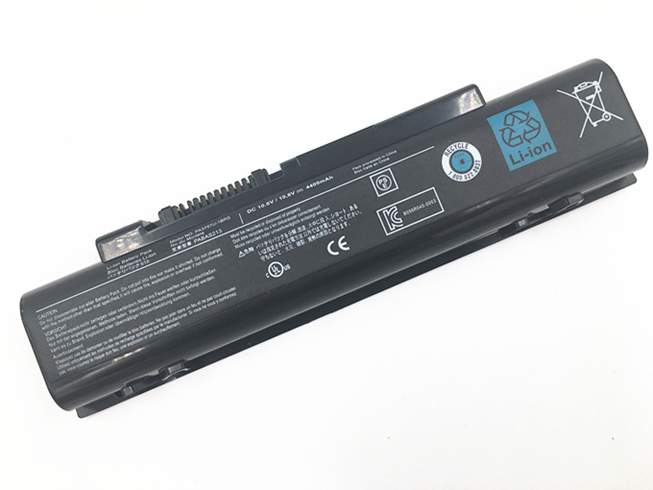
PABAS213 Replacement Battery for Toshiba Qosmio T750 T751 T851 F60 F750 F755 V65 (4400mAh/48wh)
$80,66
If your Toshiba Qosmio T750 T751 T851 F60 F750 F755 V65 is no longer holding a charge as well as it used to, or if it is swelling, it may be time to replace the battery. This battery is a great option for restoring your Toshiba Qosmio T750 T751 T851 F60 F750 F755 V65 to its original performance.
Fast & Free Delivery
Easy 30 Day Return Policy
12-Month Warranty
Secure online payments
Easy 30 Day Return Policy
12-Month Warranty
Secure online payments
Capacity:
- 4400mAh/48wh
Voltage:
- 10.8V(Compatible with 11.1V)
Battery Type:
- Li-ion
Model:
- PABAS213
Compatibility:
- Toshiba Qosmio T750 T751 T851 F60 F750 F755 V65
Toshiba Qosmio T750 T751 T851 F60 F750 F755 V65 — 10.8V(Compatible with 11.1V) Li-ion Replacement Battery (PABAS213)
If your Toshiba Qosmio T750 T751 T851 F60 F750 F755 V65 is draining fast or barely lasting half a
day, this high-quality PABAS213 replacement battery brings
back the power you're used to.
Built-in protection against overcharging and short circuits
Matches original voltage and capacity specifications
Backed by a 12-month warranty
Replaces the following parts
PABAS213 PA3757U-1BRS
Compatible with the Following Devices
Battery Number: 6 Cells
Weight:308.5g
Dynabook Qosmio T750/T8BD Dynabook Qosmio T851 Qosmio F60-033 Qosmio F60-10U Qosmio F60-10X Qosmio F60-12W Qosmio F750-1001X Qosmio F750-10Q Qosmio F755-3D320 Dynabook Qosmio T750/T8A Dynabook Qosmio T750/T8B Dynabook Qosmio T750/T8BJ Dynabook Qosmio T750/T8BS Dynabook Qosmio T751/T8CR Dynabook Qosmio T751/T8CW Dynabook Qosmio T851/D8CR Dynabook Qosmio V65 Dynabook Qosmio V65/87M Dynabook Qosmio V65/88L F755-3D290 Qosmio F60-00M Qosmio F60-00Y Qosmio F60-05E Qosmio F60-10H Qosmio F60-10K Qosmio F60-10L Qosmio F60-10V Qosmio F60-10W Qosmio F60-11L Qosmio F60-121 Qosmio F60-136 Qosmio F60-15N Qosmio F60-S530 Qosmio F750 Qosmio F750/02Y Qosmio F750-1002 Qosmio F750-1002X Qosmio F750-1004Xt Qosmio F750-1006X Qosmio F750-10M Qosmio F750-10N Qosmio F750-117 Qosmio F750-11M Qosmio F750-11V Qosmio F755-3D350 Qosmio F755-S5219 Dynabook Qosmio T750/WTVA Dynabook Qosmio V65/86L Qosmio F60 Qosmio F60-10J Qosmio F60-BD531 Qosmio F750-1003X Qosmio F750-10L Qosmio F750-11U Qosmio F755 Qosmio Dynabook Qosmio T750
Compatibility Note: Please check your original Battery model before ordering. Professional installation recommended.
What's in the Box
1x high-quality replacement battery for Toshiba Qosmio T750 T751 T851 F60 F750 F755 V65 (PABAS213, 4400mAh/48wh )
RELATED SEARCHES
-
Toshiba PA3420U-1BAS L10 L20 PABAS059 Replacement Battery
-
Toshiba Dynabook CX/45F CX/45G CX/45H CX/45J Replacement Battery
-
Toshiba Dynabook PS0231UA1BRS Replacement Battery
-
Toshiba Satellite S75 P75-A7200 P75-A7100 S855-S5378 Replacement Battery
-
Toshiba Satellite L55-A5284 L55-A5284NR L55-A5299 PA5107U-1BRS Replacement Battery
-
Toshiba Dynabook Pro L50-G-11H L50-G-10A L50-G Replacement Battery
-
Toshiba Dynabook Portege X30W X30W-J Replacement Battery
-
Toshiba Dynabook Satellite Pro L50-G Replacement Battery
-
Toshiba Dynabook X30L-J PCR10T-04N00X PCR10L-13L011 Replacement Battery
-
Toshiba Excite A204 AT10-B Replacement Battery
-
Toshiba Dynabook G83 GZ83 Replacement Battery
-
Toshiba Portege Z20T-C-11K Z20T-B-108 Z20T-C-13E Z20T-B Replacement Battery
-
Toshiba Portege R700 R705 R830 R840 R930 R935 Replacement Battery
-
Toshiba Portege X30 X30T-E-113 X30-T-E Replacement Battery
-
Toshiba PABAS285 G71C000KA510 Replacement Battery
-
Toshiba Portege A30-E A30-E-10N A30-E-120 Replacement Battery
Toshiba Qosmio T750 T751 T851 F60 F750 F755 V65 Battery Specifications:
| Condition | New |
| Capacity | 4400mAh/48wh |
| Voltage | 10.8V(Compatible with 11.1V) |
| Battery Type | Li-ion |
| Model: | PABAS213 |
| Compatibility: | Toshiba Qosmio T750 T751 T851 F60 F750 F755 V65 |
| Dimensions | 208*53.9*20.3mm |
| Certifications | CE, RoHS, UL |
| Protection Functions | Overcharge, Deep Discharge, Overvoltage, Overcurrent, Short Circuit |
| Warranty | 12 Months |
Upgrade your Toshiba Qosmio T750 T751 T851 F60 F750 F755 V65 with a high-quality replacement Battery and enjoy improved performance and longer usage time.
Battery Care Tips
Getting Started
Charge your new battery fully before you use it for the first time. Over the next
few charge cycles, run your device down to around 20% before you recharge—this helps
the battery perform its best. After that, charge whenever you need to.
Keep It Healthy
Avoid letting your battery completely drain or staying plugged in constantly. Both
extremes wear it out faster. Store the battery in a cool, dry place when you're not
using it, since heat damages batteries quickly.

.jpg)
.jpg)
.jpg)
.jpg)
.jpg)
.jpg)


.jpg)
.jpg)
.jpg)


.jpg)

Shipping policy
We strive to ensure that your order arrives quickly, safely, and on time.
Free Worldwide Shipping
We offer FREE shipping on all orders.
Processing Times
Orders are generally processed and shipped from our facility within 1-2 business day (excluding weekends and holidays).
Delivery Times
Once shipped, orders typically arrive within 7–15 business days within the contiguous United States, depending on the shipping method and destination.
Please note: These are estimated delivery times. Actual delivery may be affected by customs clearance, weather, or other unforeseen circumstances. We appreciate your patience and understanding.
Tracking Information
When your order has shipped, you will receive an email informing you of your package being shipped along with a tracking number. If for any reason you don't receive this or for more shipping information, please contact us along with your order number.
Please note, tracking can take around 24---48 hours to update after dispatch.
Important Information
We are not responsible for incorrect addresses entered by the customer.
Payment policy
My Battery Parts accepts payments by any of the following methods:
Visa, MasterCard, American Express, and Discover Credit and Debit Cards, Google Pay and PayPal.